Standard IPFS or Instareveal







Before you kickstart your upload with us, lets make sure you’re choosing the right uploading solution for your needs! At Scatter you can choose from using our brand-new and super user-friendly in-house Uploader, or you can choose to use IPFS as a hosting option.
Our new Uploader relies on Scatter to host your artwork for you, so as long as we are around, we will host it all for you for free. It is the easiest, simplest, most user-friendly and cheapest option, but obviously it requires trusting us, and there are no guarantees your work will be hosted forever.
With IPFS you are usually still relying on a provider to host for you (unless you self-host, which remains another, more complex option). Still, its decentralized design allows content with the same URL to be hosted on multiple nodes. IPFS will require a lot more technical understanding and manual work from you to setup compared to our Uploader. It's also not a guarantee that your work will just stay up, SOMEONE still needs to host it, and it's most likely still going to be you / your provider (which you will more than likely pay for).
Comparison Between Options:
| Upload Method | Simple to Use | Free | Decentralized | Hide Tokens Until Minted |
|---|---|---|---|---|
| Scatter Uploader | ✅ | ✅ | ❌ | ✅ |
| Standard IPFS | ❌ | ❌ | ✅ | ❌ |
| Instareveal IPFS | ❌ | ✅ | ✅ | ✅ |
For the people who still decide to put in the extra, somewhat more technical work for IPFS, we will continue to explain the difference between using Standard IPFS (upload to Filebase / Pinata), or Instareveal IPFS on Scatter:
If you're not using our brilliant new Uploader, you’ve got other basic options to pick from, like a Standard IPFS upload or Instareveal IPFS ( there is also Self-Hosting, but that is too complex to cover in just this one article). Think of it as choosing between classic reliability and instant gratification - both get the job done, it just depends on your needs. In this post we’re going to fully cover both options and give you the basic checklists.

1. What Is Standard IPFS?
The InterPlanetary File System (IPFS) is a decentralized way to store and share files online. Instead of using a single central server, IPFS distributes your content across a network of computers. Each file gets a unique “content identifier” (CID), ensuring it can always be found and verified.
IPFS hosting offers durability and transparency - your files remain accessible as long as they’re pinned or hosted by nodes on the network. It’s a great option for preserving digital art, NFTs, or long-term projects. However, because it’s decentralized, accessibility depends on how reliable the pinning service is.
For Standard IPFS Uploads, we usually recommend Pinata or Filebase - they’re tried, tested, and work great. You can also explore newer routes like self-hosting or Arweave, a cool, novel alternative for decentralized pinning.
Pros:
- The fastest way to upload
- Doesn’t need Scatter assistance
- You don’t need to learn how to launch a script
Cons:
- NFT snipers can get all the rares, meaning there are individuals that can view NFT data before they’re minted, allowing them to snipe rares. This can leave the community and true collectors feeling upset.
- Easy to re-use base URI to front-run and launch a copycat collection
- IPFS providers ask you to pay for hosting the images and metadata
2. What Is Instareveal?
If NFT sniping has you on edge, Instareveal solves this. Scatter securely hosts your art and metadata, keeping it hidden from prying eyes until the moment of mint. Both a Standard Upload and Instareveal use IPFS hosting.
Don’t be confused by the name Instareveal. You may think with a Standard Upload you won’t see the NFTs revealed instantly once they are minted, but nope! You will see your images revealed instantly no matter what option you choose, Standard or Instareveal. The main difference is that with Standard, all of your images are already revealed right after you upload them to IPFS, but with Instareveal, they are hidden by default and reveal one by one only after each token ID has been minted.
So while with a Standard Upload bad actors can easily view your NFTs and snipe rares even before mint starts, with Instareveal it’s impossible, and you can be sure your community has equal chances to get rares or 1/1s, making the mint experience really fair and fun.
Also Instareveal prevents you from scammers who launch copycat collections, front-running your launch by simply re-using your base URI. If they do this, and people mint their collections instead of yours, it won’t reveal the NFTs. Only token IDs that have already been minted in your collection will be visible in copycat collections, the unminted IDs won’t be revealed in them. And people who have minted those collections will start asking them questions in socials and understand it was a scam faster, so the scammers have much less chance to front-run you.
With Instareveal we actively discourage you from hosting your own files before talking to us. If your files are already hosted, they will become visible on IPFS.
Pros:
- Prevents rare NFT sniping
- Prevents front-running, hard to launch a copycat collection
- Free to use if you launch your collection on Scatter
Cons:
- Takes more time to upload
- Needs Scatter assistance
- You should learn how to run Python script
3. Do You Have All The Required Files Prepared?
Please make sure all the files are in the correct formats and properly organized for the upload, as set down below for both Standard IPFS Upload and Instareveal, respectively.

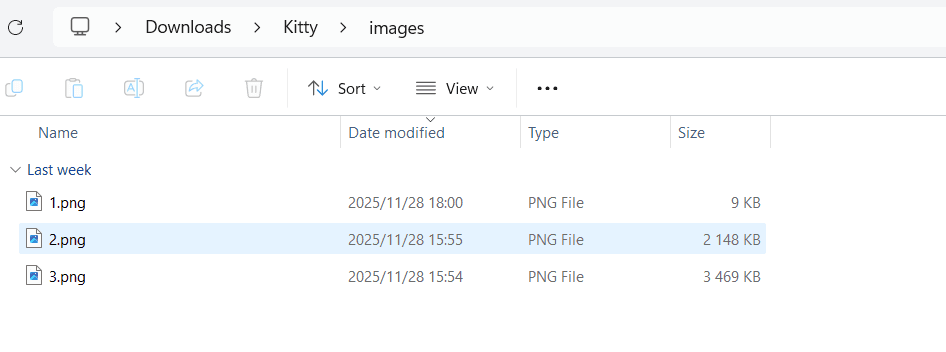
Images
This is the finalized, high-resolution, high-quality files of your art/NFT.
We support many different popular formats such as images, video and 3D. Your
images should be numbered in the order you want them to appear/mint, each file
name should be the corresponding number (e.g. first image is 1.png, second is
2.png, and so on). The images should be named 1.png, 2.png, 3.png and
shouldn't have custom names like image_1.png, image_2.png, image_3.png.
Don't start them at 0 because our indexer cannot pick up a zero, always start
at 1.
Make sure they are all organized into a single folder, unzipped, simply named
images, lower case:
Metadata
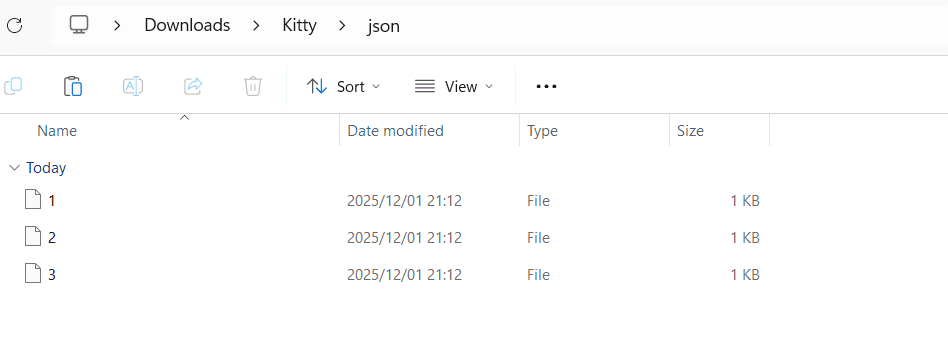
This is the descriptive details about your files such as image link, title, collection description, attributes/traits and creator info, all formatted into JSON files.
For each image file there needs to be a corresponding metadata/JSON file. Please
make sure they're numbered correctly (as mentioned with images) and make sure
JSON files have no file extensions - they should be named 1, 2, 3 and not
1.json, 2.json, 3.json. We have a variety of scripts and webtools
available that you could use:
- To clean up JSON extensions use https://webtools.scatter.art/remove-file-extensions/ ↗
- If you only have your art and no JSON files, you can easily create some JSON files here with no traits https://webtools.scatter.art/generate-json-no-traits/ ↗, an example of a basic JSON with no traits:

Make sure to have your metadata organized into a single folder, unzipped, simply
named json, lower case:
For more about metadata, please read our handy documents:
https://docs.scatter.art/creators/metadata/ ↗
3.1. Standard IPFS Details:
The image field in the JSONs should have links of your images already hosted on
IPFS, for example: "image": "ipfs://IMAGESFOLDERCID/1.png"
Preparing the abovementioned materials in advance helps ensure a smooth upload process and consistent, reliable storage on the IPFS network. Once everything is ready, it only takes a few simple steps to upload your art and generate a base URI for your collection on Scatter:
- Upload images and get an images folder CID
- Create/edit your metadata with image links in it using that images folder CID
- Upload your metadata and get a metadata folder CID
- Use this final CID to set the base URI for your Scatter collection in a format
ipfs://CID/
For more on preparing your files and a Standard IPFS Upload, please read our guide:
https://docs.scatter.art/guides/deploying-and-uploading ↗
If any part of the process feels unclear or you encounter any issues, please don’t hesitate to open a support ticket in our Scatter Discord, our team is always happy to help!
3.2. Instareveal Details:
The image field in the JSONs should have "REPLACEME" in the position of the IPFS
CID, for example: "image": "ipfs://REPLACEME/1.png". These links will be
auto-replaced with the correct CID during the pinning process. You can use this
tool https://webtools.scatter.art/update-image-fields/ ↗ to edit them.
If you want to use Instareveal, here is what you need to do:
- You will need to inform us at least 24 hours before your planned mint so we can set it up for you. We need to ensure that everything is setup correctly to ensure a smooth minting experience. To do so, please open a ticket in our Scatter Discord.
- You need to read through the Instareveal documents before commencing https://docs.scatter.art/docs/creators/instareveal ↗.
- Run the verification script on your metadata https://github.com/Scatter-Partners/useful-scripts/blob/master/verify/verify_for_instareveal.py ↗ and post the script output in your Discord ticket.
- Once there are no errors in the script output, put your files all into a
single .zip, with only 2 folders inside named
imagesandjson. Upload it somewhere like Google Drive and share a link with us in your Discord ticket. - Deploy your collection on Scatter (leaving base URI blank) and share its contract address with us.
- We will set-up Instareveal for you and give you a base URI. Now you can set it for your Scatter collection using the EDIT tab.
In conclusion, whether you go with a Standard or Instareveal IPFS upload, Scatter’s got you covered every step of the way. Our team is always just a message away - ready to chat, guide, and make sure your upload experience is smooth from start to finish. So don’t be shy, reach out anytime!