Burn to Mint
Burn-to-mint lets collectors exchange existing NFTs for NFTs in your collection. It is different from a regular public or whitelist mint list. Read Mint Lists first for normal sale and claim setup.
Plan Before You Configure
Each collection can have only one burn list, with one source ERC-721 contract at a time. After you create it, the Burn Lists tab displays Only one burn list is allowed per collection and disables Create Burn List. Use the existing list to make supported changes.
Need multiple burn lists? Contact the Scatter team before deploying. Multiple burn lists may be considered for a future feature, but only one is currently supported. Discuss your collection's requirements with Scatter on X or Discord before choosing a deployment setup.
Decide which source collection will be exchanged, the input/output ratio, any additional mint price, the payment currency, the schedule, and the wallet limit. If you plan a cyclical mint, review the cyclical-mint safeguards before enabling it.
Create a Burn List
- Open Burn Lists in Collection Management and select Create Burn List.
- Complete the Create New Burn List form using the settings below.
- Check the source contract, payment currency, price, ratio, and schedule, then select Create Burn List and complete the wallet confirmation.
- Review the created row. It shows Name, Price, Start Time, End Time, Ratio, and Burn Contract.
Burn List Settings
| Field | What to set |
|---|---|
| Name | The name used to identify this burn list. |
| Start Time | When the burn mint opens. The form shows local and UTC times; a past time uses the current block time. |
| End Time (Optional) | Leave empty for no end time, or set an end for the burn mint. |
| Wallet Limit (Optional) | The maximum mints per wallet. Leave empty for no wallet limit. |
| Payment Type | The native currency or ERC-20 charged in addition to the NFT burn. Choose carefully: changing currency after creation is not supported. |
| Price | The payment charged per mint in the selected currency. A value of 0 adds no mint price; network gas still applies. |
| Burn ERC721 Address | The contract address of the source collection whose NFTs will be burned. |
| Burn Ratio | The exchange amount, interpreted together with Reversed Ratio. |
| Reversed Ratio | Off: burn the ratio amount to receive 1 NFT. On: burn 1 NFT to receive the ratio amount. |
For example, Burn Ratio = 3 with Reversed Ratio off requires burning three NFTs for one new NFT. With Reversed Ratio on, burning one NFT gives three new NFTs. Check the exchange against remaining supply before launch.
Edit an Existing Burn List
Select the existing list to open Edit Burn List. You can rename the list and change Burn ERC721 Address, including changing it to the collection's own contract for a cyclical mint. Select Update Burn List, complete the wallet confirmation, and check the updated name and burn contract in the row.
Changing payment currency after creating the burn list is not supported. The Payment Type field stays locked, and the one-list restriction prevents adding another burn list with a different currency. Choose the currency before creating the initial list.
How Burning Works
Scatter's contract factory offers Burn To Mint functionality. This involves permanently burning one or more NFTs to mint a new NFT. By default NFTs burned through Scatter's Burn to Mint functionality are transferred on chain to burn wallet 0x000000000000000000000000000000000000dEaD. To use an alternate burn address, reach out to us on X or Discord.
Holders of the configured source token can redeem while the burn list is open, its wallet allowance permits the mint, and supply remains. Any configured payment is required in addition to the NFT burn.
You can only burn collections you own, and only if they were deployed on Scatter or are in the Scatter database. If it's not a Scatter collection that you wish to burn, you still need to be the owner of it. Grant transfer permissions from the burn contract to your new contract at Etherscan (usually it's the SetApprovalForAll function) and open a ticket in Scatter Discord ↗, because we have to manually import the collection in our DB.
Cyclical Burn to Mint
Cyclical burn-to-mint burns NFTs from a collection to mint new NFTs in that same collection. Set Burn ERC721 Address to the collection's own contract address to configure it.
Avoid a free 1:1 cyclical mint. A holder could repeatedly burn each newly minted NFT to mint another, consuming the remaining mintable supply for little more than gas. Require an ETH/native-token or ERC-20 payment, or require more NFTs to be burned than are minted. You can combine both safeguards.
For a 2 burned → 1 minted setup, set Burn Ratio to 2 and leave Reversed Ratio off. Turning reversal on would instead give two NFTs for one burn. If using a payment to discourage repeated cycling, set a meaningful Price in your chosen currency rather than a negligible fee. Review the wallet limit and test the full exchange before opening it to collectors.
Burn to Mint Contract Methods
The contract controls Address, Reversed, Ratio, Start Time, and Limit correspond to the form's Burn ERC721 Address, Reversed Ratio, Burn Ratio, Start Time, and Wallet Limit. Use the burn-list settings above for their meanings.
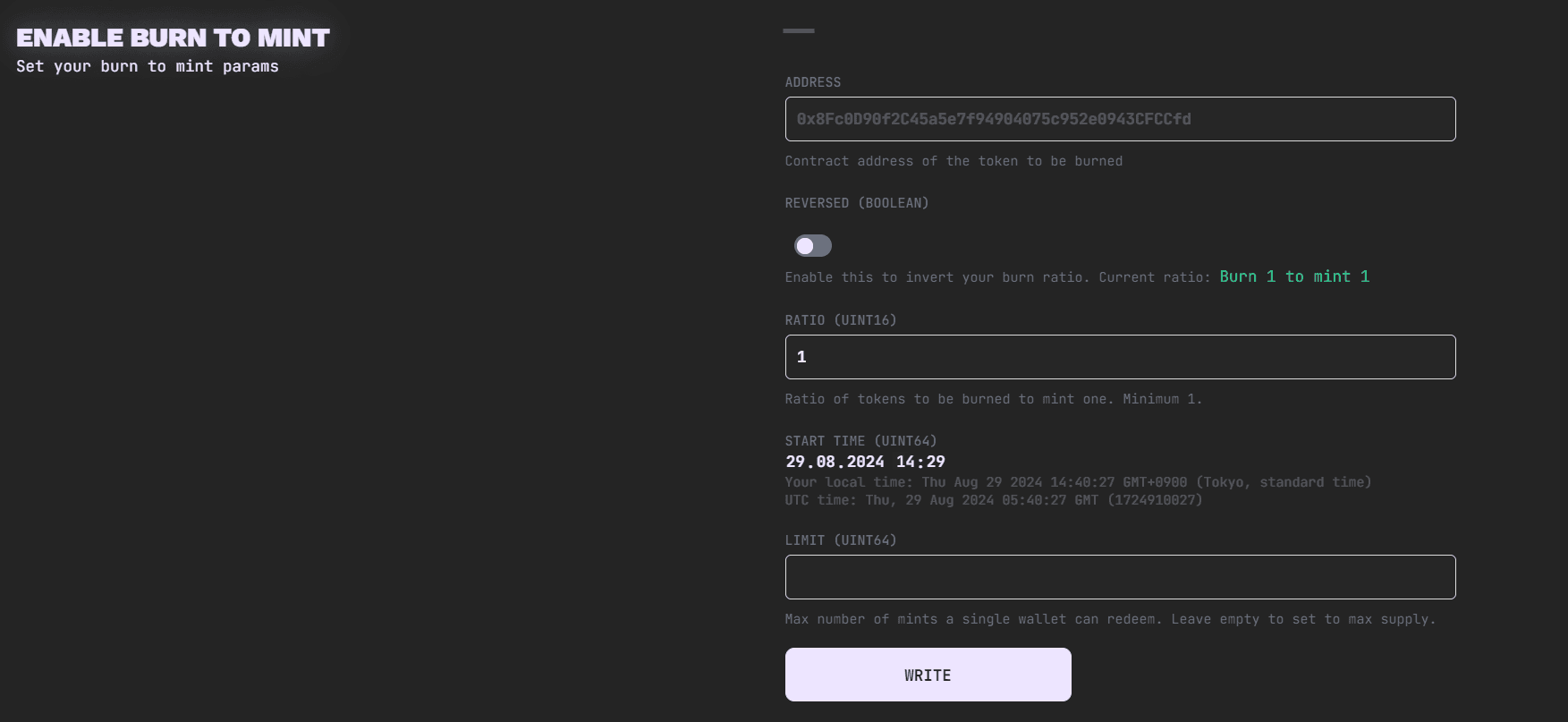
Before launch, check your ratio, remaining supply, and wallet limits. For help with a non-Scatter source collection or an alternate destination for burned tokens, open a ticket in Scatter Discord ↗.