Mint Lists
Mint lists (also called invite lists) are what you'll use to set and price the various levels of your mint. Your public sale as well as any early mints, whitelists, and free claims, will all need to be set up via mint lists.
Mint levels defined by a whitelist mint list will only be accessible to addresses on that mint list. Public mint lists are open to everyone, and the Enemy List option changes which lists its addresses see. People who are not connected to Scatter will only see the Public mint lists for your collection.
Minting will not begin on your collection until you create at least one valid mint list for it. To allow public minting, you must create a mint list with no addresses on it.
Before you start:
- Deploy first: Create and Launch an NFT Collection
- Configure profile: Collection Profile & Branding
- Upload content: Uploading Content
Check your addresses before creating a list. The address set is fixed on-chain and cannot be edited afterward. Lists cannot be deleted; disable an old list and create a replacement if the addresses need to change.
A replacement list starts over. Previous mints and used allowances do not carry over to the new list. Plan its addresses and limits so the replacement does not unintentionally give people another free claim or mint allocation.
Creating a mint list
- Open Mint Lists in Collection Management. A new collection can show No Mint Lists Found until you create its first list.
- Click New List to open the Create Mint List form.
- Enter the name, addresses, schedule, currency, price, and limits described below. Review Enemy List and Unit Size before submitting.
- Check the address set carefully, then select Create Mint List and complete the requested wallet confirmation.
The table shows each list's Name, Root, Addresses, Price, Currency, Start Time, End Time, Wallet Limit, List Limit, Multiplier, and Status. The root identifies the address set; see Duplicate Address Sets before creating another list for the same audience.
Types of mint lists
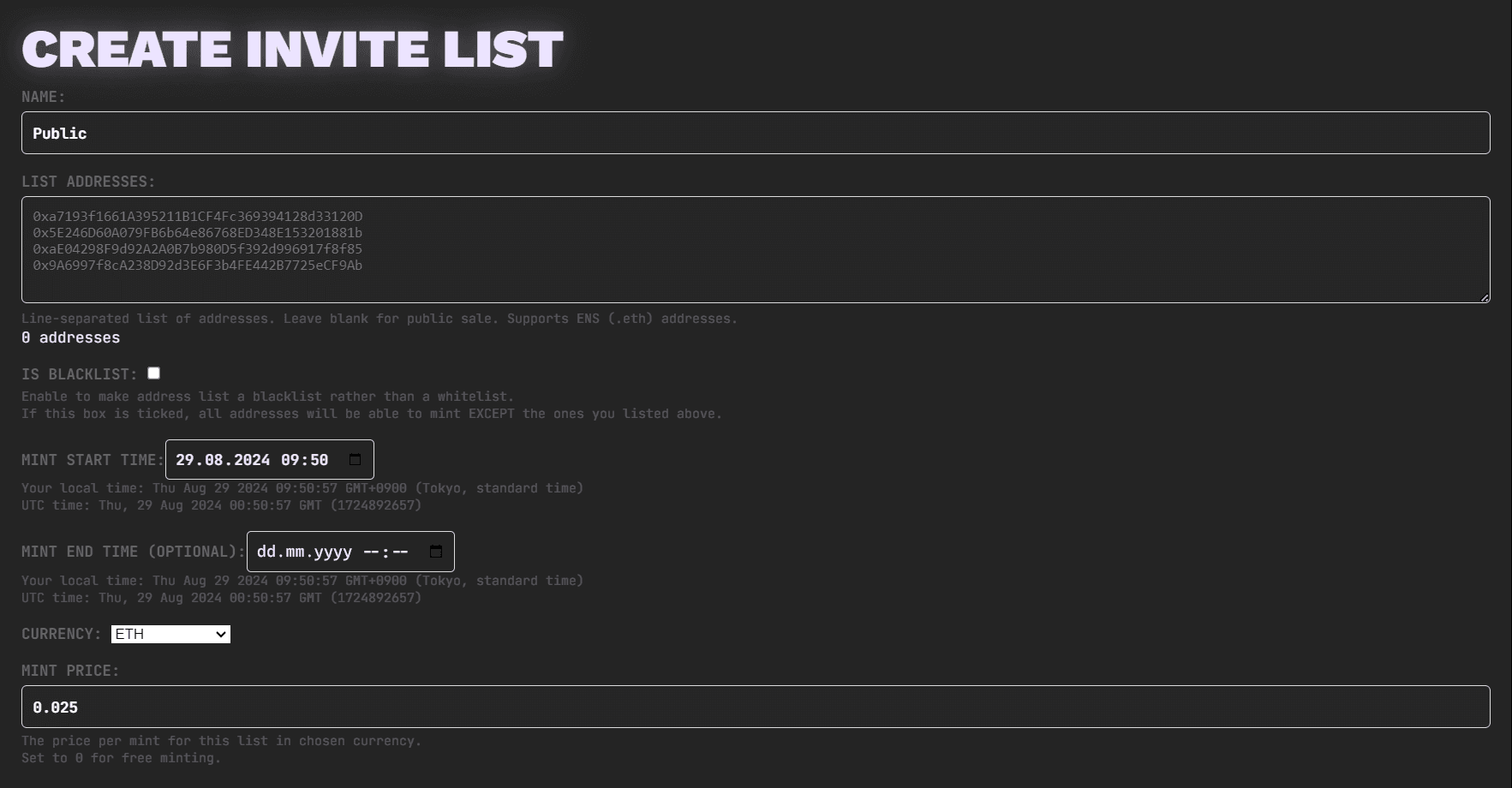
Public - This is the type of mint list that will need to be created in order for your open/public mint to occur. In order to set conditions for your public onsale, create a new mint list, leave the address section blank (yes, blank!) and fill in the price/timing for what will be the "main" public mint for your project.
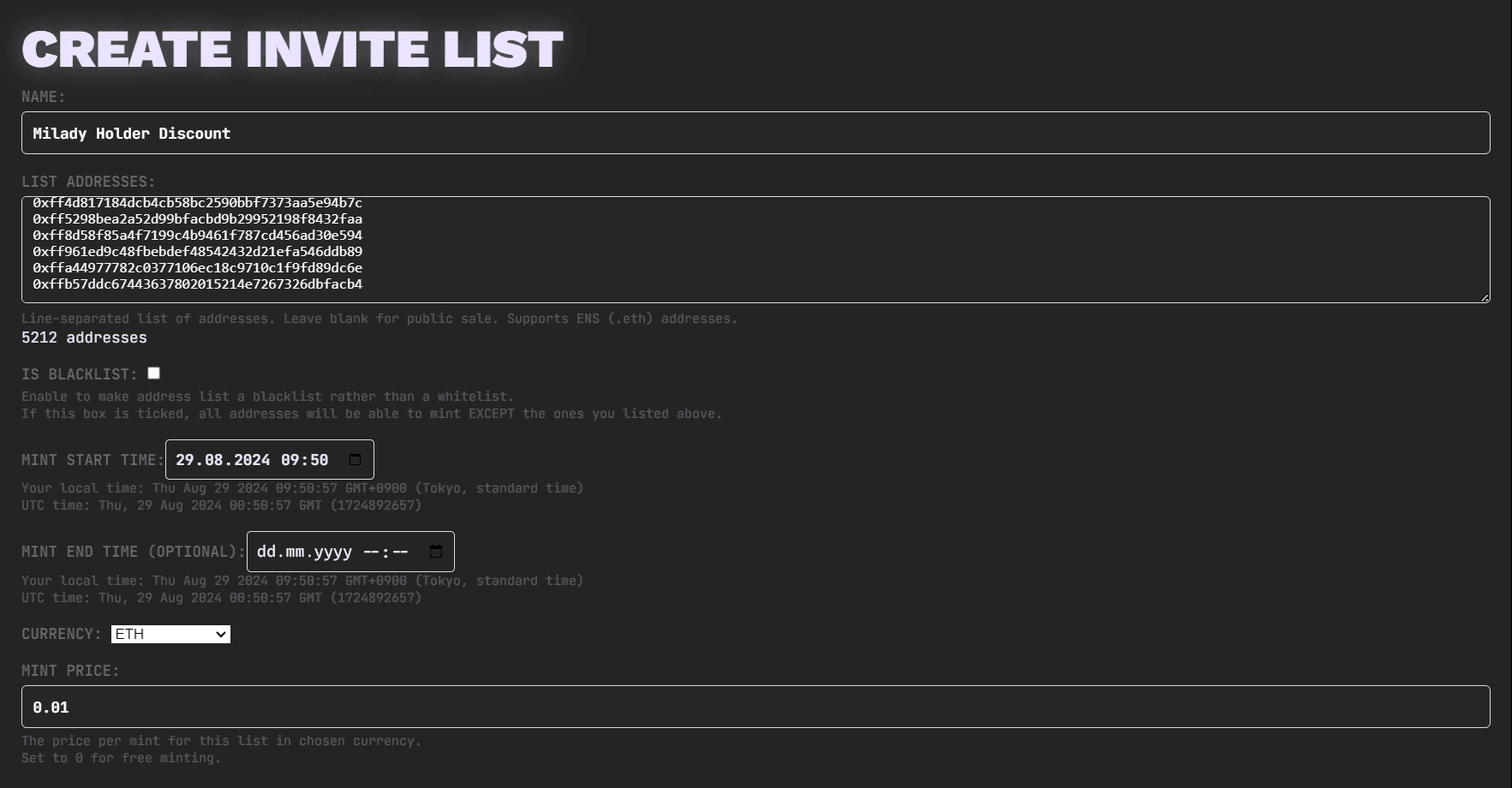
Whitelist - In many instances a project may want to permission particular addresses to mint early, mint at a discounted price, or mint for free, these schemes are broadly referred to as "whitelists". Creating a whitelist on Scatter is very simple. After creating a new mint list under the "mint lists" tab, fill the addresses field with the addresses you're wishing to add to your whitelist. Using the subsequent fields you can then set the particular time/price/availability parameters you want to apply to this particular mint list of addresses.
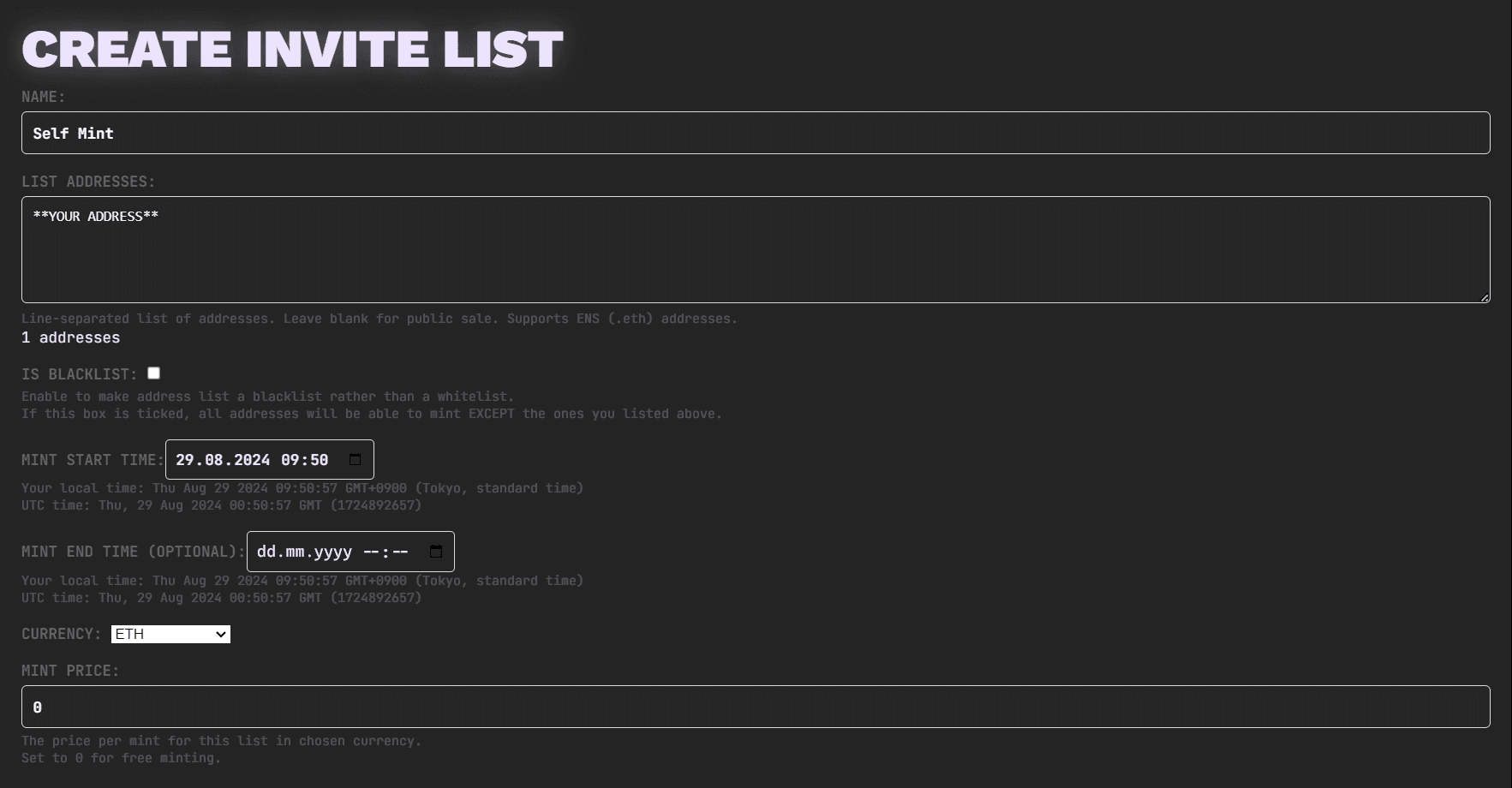
Self Mint - In some cases, for a variety of reasons, the artist or team behind a collection may need an owner-only list for team allocations or airdrops. See Self-Minting for creating that list and using Batch Mint To.
Enemy Lists
Enabling Enemy List means addresses on that list only see that list, even if they are eligible for other mint lists. Review its price, timing, and limits with that visibility rule in mind. Leave the option off for a normal public or whitelist list.
Prepare Your Address List
For a whitelist, collect the eligible wallets before creating the list. Use holders.art ↗ to snapshot holders of one or more NFT collections. It expects collection contract addresses, not individual wallets; add any individual wallets to the resulting list afterward.
If you are combining snapshots or resolving ENS names, the Dedupe and Merge tool ↗ can merge TXT files, resolve ENS, and remove duplicates. Scatter also resolves ENS and removes duplicate addresses when you submit a mint list, so this tool is optional. For scripts, see Whitelist Snapshots.
Review the final addresses before submitting. A snapshot is a list of wallets at that point in time; it does not automatically update as NFT ownership changes.
Set up mint lists
- Name: The name of the mint list. This name is visible to anyone who is eligible for the mint list.
- List Addresses: The list of addresses if any for the mint list. If you leave this blank it will make the mint list public, a mint list anyone can use. Enter one address per line; the form displays a unique-address count. You can include .eth ENS domains here. Mint lists submitted will automatically be de-duplicated. Addresses cannot be modified after a mint list is created.
- Start Time: When minting opens for this list. The form uses your local time and displays a Local / UTC conversion beneath the field. Check both when coordinating a launch across time zones. The initial value is the current time; use a future time if minting should open later.
- End Time (Optional): When the list should stop accepting mints. Leave empty for no end time, or set an end for a limited sale or early-bird phase.
- Currency: Choose the mint payment currency. Mint lists support native tokens and ERC-20s. For ERC-20 mints, use a valid token contract address; Scatter reads its symbol and decimals on-chain. This is separate from the marketplace's Settlement Currency.
- Mint Price: The amount charged per mint in the selected currency. Enter 0 for a free mint price; public-list platform fees can still apply. See Minting Fees and Charms.
- Sale Type: Mint lists created in the collection editor use fixed prices.
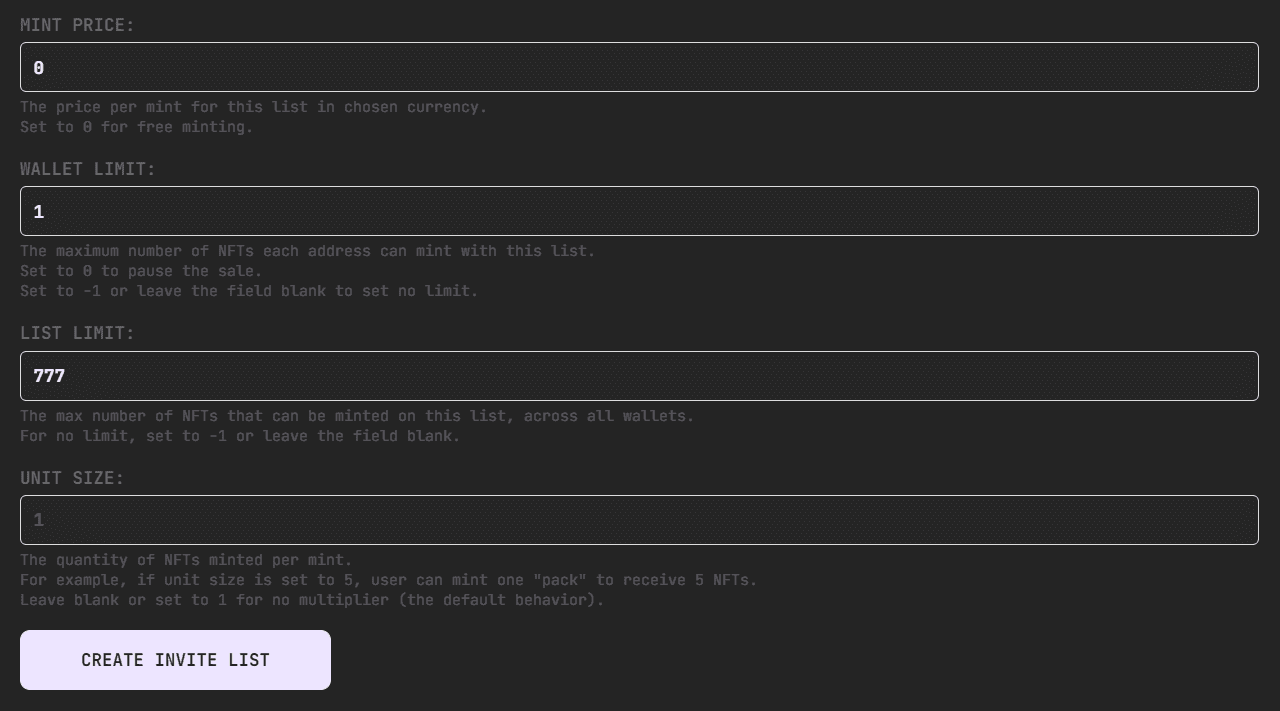
- Wallet Limit: The maximum number of NFTs a specific wallet can mint. For 1X free mint lists you want to make sure this is set to 1. If you mistakenly set a wallet limit that is higher for a free mint it can enable people to mint many more NFTs than they should be able to, so make sure you set this right. Leave the field empty or enter -1 for no wallet limit. Set it to 0 if you need to disable a mint list; see Disable or Replace a Mint List.
- List Limit: The maximum number of NFTs which can be minted on this mint list. This is useful for limiting the maximum number of free mints that can be claimed, or mints that can be claimed at discounted prices. Leave empty or enter -1 for no list limit. Setting it to 0 disables the list.
- Enemy List: Listed addresses only see this list, including when they qualify for other lists. See Enemy Lists.
- Unit Size (multiplier): The amount of NFTs that are minted per number in the mint field. 1 means no multiplier. For example, a unit size of 5 gives the minter five NFTs for one pack. This is useful for minting concepts of "packs" where you order your collection in a certain way such that every 10 mints there is 1 NFT guaranteed of a certain type. You must make sure that your wallet limit is set at multiples of the unit size. You can test your setups on the testnet to ensure you have it right.
When a list limit is set to the max supply, tracking of that limit is not performed. This is done to conserve gas, as tracking becomes unnecessary in this scenario and would only incur additional gas costs without providing any functional benefit.
It's important to note that since the list limit isn't tracked on-chain when the list limit is the same as the max supply, lowering the list limit below the max supply will initiate tracking from zero. To ensure accurate minting control, if you decrease a list limit from the max supply to a lower amount, you must manually account for any mints that have already occurred. This is crucial if you intend to restrict the total number of mints from that list to a specific amount.
Disable or Replace a Mint List
There is no separate Pause function. Setting either Wallet Limit or List Limit to 0 effectively disables that list. The on-chain record still exists: disabling a list is not deleting it.
To stop using a list or correct its addresses:
- Open the collection editor's Mint Lists tab and select the old list.
- Set Wallet Limit or List Limit to 0 and save the change. Complete any wallet confirmation and wait for it to be confirmed.
- If the list needs replacement, prepare the corrected address set. Review anyone who already minted from the old list and decide their eligibility and allowances for the new one.
- Click New List, use the corrected addresses, and configure its price, timing, wallet limit, and list limit. These are new allowances; they do not inherit the old list's mint history.
- Confirm the old list is disabled and the replacement has the intended conditions before sending collectors to mint.
If you only need to change the existing list's editable settings, such as its price or timing, update that list rather than recreating the same addresses.
Duplicate Address Sets
Each address set has a Merkle root, which identifies that set on-chain. Trying to create another list with the same address set can produce the error Duplicate record. You already have a mint list with merkle root: 0x....
If you need the same audience with updated conditions, edit the existing list's settings. The existing workaround when a genuinely separate list is needed is to add a distinct address, such as your own wallet or the zero address, to produce a different set. Review the consequences: adding a wallet makes it eligible, and a new list starts its allowances over.
Free Mints
Private free mint lists appear to eligible collectors as Charms, bringing their available free mints together in one section on Scatter.
Giving other collections 1X free mint for your collection is one of the best marketing tools you have. Other collections love that value is being given to their holders and are more likely to give you promotion in return as thanks.
Free mints are not entirely free, they still require a gas fee to claim, and when gas is high it can be painful for people to claim your free mints. Do not let that stop you from offering them however. Gas prices go up and down and people can wait until gas is lower to claim their free mints.
Public free mints are discouraged as they are often botted. Public lists also have a minimum platform fee on applicable contracts, while private free mint lists (Charms) have different fee rules. See Minting Fees for the conditions and amounts.
The process to setup free mints is simple.
- Prepare your address list from a holder snapshot of the collection you wish to give free mints to.
- Create a list for your collection where you paste this list of addresses into, and make sure that the wallet limit is set to 1.
- Only the holders of that collection in that snapshot will be able to mint.
Even major collections offer some kind of free mint so if you are not planning on having one you should reconsider. You can add more collections to free mint over time.
If you want to setup public free mints (i.e. anyone can mint for free) make sure you've set the list limit as well, otherwise the whole supply may be minted out by bots. Generally, it is advisable to avoid public free mint lists as they tend to attract bots, resulting in fewer tokens being distributed to genuine community members. A preferable approach would be to take snapshots of existing collection holders within your community and offer free mints to them. You can create more free mint lists with snapshots of more collections over time, but check for overlapping wallets: each new list grants its own allowances.
If you want to setup public free mints on L2 chains (like Base, Arbitrum, etc) you should understand it’s even more of a bad idea, since minting there is so cheap that wallet limits alone do not prevent bots from using many wallets. The public-list platform fee still applies; use snapshots of wallets from your community for private free mint lists instead.
Next Step
If your collection will exchange existing NFTs for new ones, read Burn to Mint. Otherwise, review your setup before enabling public visibility and announcing your mint.