Contract Minting
You can mint directly from a Scatter collection contract using its blockchain explorer's write interface. This is an advanced alternative to the Scatter minting page. The available functions and fields depend on the collection's contract type and version.
Scatter contracts do not mint based on sending them ETH directly, you must use the mint function.
Find the Correct Contract and Function
- Copy the collection's contract address from its Scatter page and open it on the explorer for that network, such as Etherscan or BaseScan. Check both the address and network.
- Open Contract → Write Contract, or Write Contract as Proxy where applicable, and connect the wallet that will mint.
- Choose the mint function exposed by that contract. ERC-721 contracts can expose mint; the ERC-1155 example below uses mintToken, which also requires a tokenId. Follow the actual function's fields.
- Check the intended mint list, its currency and price, eligible token ID, schedule, remaining allowance, and available supply.
Newer ERC-721 and ERC-1155 contracts include a constraints tuple in the mint form. Older versions may not have it. Use the deployed contract's verified interface as the reference: do not add constraints to a function that has no such parameter, or omit them from one that requires it. Older screenshots and proof-tool hints may show a different form.
Authorization and Common Inputs
- Payable amount: The native currency sent with the call. An explorer may label this field with the function name and show its unit as ETH. It is separate from the mint function's arguments.
- auth.key: The key for the mint list you intend to use. Do not assume every public or private list uses the same key.
- auth.proof: The list's Merkle proof for the minting wallet, entered as a
bytes32[]array. A public list can use an empty array,[]; a private list requires its matching proof. - quantity: The number to request within the list's and contract's limits. Check any Unit Size setting before assuming that the request corresponds to the same number of NFTs.
- tokenId, when present: The ERC-1155 token ID allowed by the selected list.
Do not assume the first valid ID is
0. - affiliate, when not using a shill: The zero address,
0x0000000000000000000000000000000000000000. - signature, for the no-affiliate example below: Empty bytes,
0x. A zero address and0x00are not empty bytes. Do not copy a zero-address signature hint from an older tool into this newer form.
Read the Mint Payment Quote
For contracts exposing computeMintPayment(key, quantity, affiliateUsed), open Read Contract or Read Contract as Proxy and call it before filling the write form:
- Set key to the same list key you will use in
auth.key. - Set quantity to the requested quantity you will pass to the mint function. Do not multiply it by the list's unit size yourself: this external quote function handles that conversion.
- Set affiliateUsed to
falsefor this guide's no-affiliate flow. A quote must match whether the actual mint uses an affiliate. - Read the named outputs and populate the payment and constraints as follows.
| Quote output | Where to use it |
|---|---|
currency | constraints.currency |
currencyCost | constraints.maxCurrencyCost |
nativeValue | constraints.maxNativeValue and the transaction's payable amount, using the appropriate units for each field |
totalMints | constraints.minTotalMints when requiring the full quoted output |
Read the output names rather than assuming their display order. The quote accounts for the contract's pricing rules, including unit sizes, applicable discounts, bonus output, and public mint fees. Do not replace it with a manual price-times-quantity calculation.
Base Units and Payable Amount
The quote's cost outputs and the constraint cost inputs use integer base units. Native-currency values are in wei on these networks; ERC-20 costs use that token's base units and decimals. Do not assume every ERC-20 has 18 decimals.
The explorer's payable field may instead expect an amount in ETH. Convert
nativeValue from wei for that field only when it is labelled ETH: for example,
1000000000000000 wei is 0.001 ETH. Keep 1000000000000000 as the integer in
constraints.maxNativeValue. Check the explorer's actual unit label before
entering either value.
Constraints do not send funds or grant approvals. They check the expected
currency, cap the payment costs, and set a minimum mint output. Send the quoted
nativeValue as the transaction's payable amount. For ERC-20 mints, also hold
the quoted payment tokens and grant the required allowance; sending ETH does not
replace the ERC-20 payment. A native-currency mint does not require an
additional ERC-20 payment for its currencyCost.
Keep native currency available for transaction gas, even when the mint is
free and the quoted payable amount is 0. Gas is separate from nativeValue.
If an older contract does not expose this quote function, use that version's verified pricing and payment rules rather than assuming the newer inputs apply. Reading a quote does not reserve supply or prove eligibility. Re-read it if the list, quantity, affiliate usage, or pricing changes before submission.
Newer Contracts: Constraints
The newer form exposes these fields in this order:
- constraints.currency
- constraints.maxCurrencyCost
- constraints.maxNativeValue
- constraints.minTotalMints
The confirmed example below is a free, native-currency ERC-1155 mint of one copy of token ID 1, using a private list that permits that ID and allows ten per wallet. These values are specific to that setup; they are not universal defaults for paid, ERC-20, or multiplied mints.
| Explorer field | Value |
|---|---|
| Payable amount (ETH) | 0 |
auth.key | The selected list's key |
auth.proof | That list's proof for the connected wallet |
quantity | 1 |
tokenId | 1 |
affiliate | 0x0000000000000000000000000000000000000000 |
signature | 0x |
constraints.currency | 0x0000000000000000000000000000000000000000 |
constraints.maxCurrencyCost | 0 |
constraints.maxNativeValue | 0 |
constraints.minTotalMints | 1 |
If the explorer presents constraints as a single tuple field instead of separate inputs, the equivalent value for this example is:
["0x0000000000000000000000000000000000000000", 0, 0, 1]
Use the field order shown by your contract. For a different mint, use the
payment quote rather than reusing these
zero-cost values. Keep the returned totalMints distinct from the requested
quantity: unit sizes or bonuses can make them different.
Use Simulate, where available, before submitting Write. This example passed simulation and gas estimation; simulation itself does not submit a mint transaction or guarantee that the list's state will remain unchanged.
Public Lists
Setting up free mints like this as a creator is a bad idea because they almost always get botted. Instead, if you want to do a free mint, you should use https://holders.art/ ↗ to snapshot some collections and give free mints to holders of those NFTs.
Use the public list's key and an empty proof array, []. Match its price,
currency, quantity rules, wallet limit, and list limit. A public free mint can
still have a minting platform fee, so do not
assume that a listed mint price of zero means the payable amount is zero.
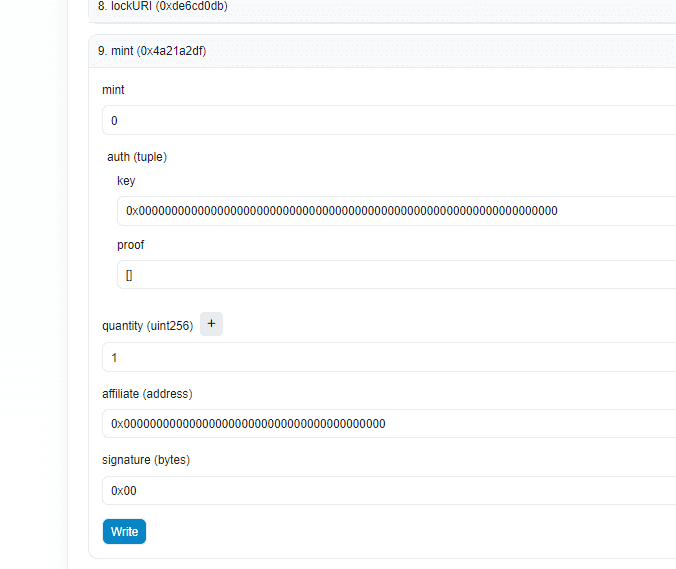
The screenshot below shows an older contract form. Use your deployed contract's current fields and the signature guidance above rather than copying it as a universal template.
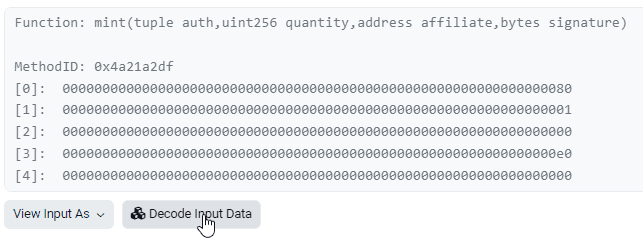
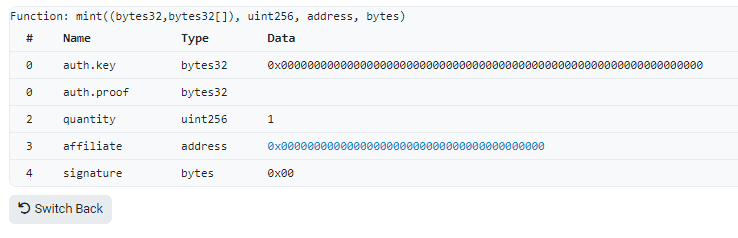
If you find and decode a transaction you will see these similar details.
Private Lists
Minting from a private list requires a Merkle proof in the auth.proof field.
Use the original address list in its original order, preserving duplicates if present in the input that generated the onchain root. Use the list actually used for that root, including any processing applied before list creation. The linked Merkle proof verifier ↗ sorts hash pairs but does not sort the address leaves; reordering the same wallets can produce a different root. Confirm that the regenerated root matches the onchain list before using a proof. See Webtools and Scripts for related tools.
Enter the proof as an array of bytes32 values, not as one combined string.
The proof authorizes the sending wallet. With mintTo, to selects the
recipient and does not need to equal the sender. Setting to to your sending
wallet mints to yourself; choosing another recipient does not make a different
sending wallet eligible.
Simulate and Submit
- Recheck the contract and network, sending wallet, list key and proof, and token ID where required.
- Read the quote for the same requested quantity and affiliate usage, then enter the payment and constraints using the correct units.
- Use Simulate, where available, and inspect any error before proceeding. A quote alone does not check every mint requirement.
- Submit Write only when the inputs and wallet request match your intent. Wait for confirmation and check the minted tokens and recipient.
Troubleshooting Reverts
These checks apply to public and private mints. Even a correct key and proof will not fix a mismatched token ID, signature, or constraint:
| Error | What to check |
|---|---|
InvalidTokenId() (0x3f6cc768) | Use an ID allowed by the list. In the example above, ID 1 works and ID 0 fails. |
InvalidAffiliateAuthorization() (0x17c892d3) | With no affiliate in the newer example, use the zero address for affiliate and empty bytes 0x for signature. A zero-address signature fails. |
UnexpectedMintCurrency() | The list's payment currency differs from constraints.currency. Re-read the quote and check the selected key. |
ExcessiveCurrencyCost() | The required currency cost exceeds constraints.maxCurrencyCost. Re-read the quote, check base units, and review the updated price before changing the cap. |
ExcessiveNativeValue() | The required native payment exceeds constraints.maxNativeValue. Re-read nativeValue, check units, and review the payment before changing the cap. |
InsufficientMintOutput() | The mint output is below constraints.minTotalMints. Check the quoted totalMints, requested quantity, unit size, and bonus rules. |
Also check the connected sender, list key and proof, start/end times, remaining wallet and list allowances, supply, payment, and any required constraints.
Other Situations
Affiliate (shill) mints and signed mint types require additional valid authorization supplied through Scatter. Those authorization flows are not covered by this manual no-affiliate minting guide. Use Scatter's minting flow unless you have the required authorization and understand the deployed contract's requirements.