Security
These precautions apply whether you are collecting NFTs, creating a collection, or using the marketplace.
Simulate Transactions
Use a tool like Pocket Universe ↗ to simulate transactions before you execute them. This will not always protect you, but can help you avoid common scams such as immediate wallet drainers.
No Talking
Do not talk to anyone using your real identity about your crypto or NFT related activities. If criminals know you have any crypto related assets they may go after you and your family if they figure out you are an easy target.
If you have a reputation as someone into crypto plan your downfall now. You lost your phone in a boating accident and didn't back up your recovery phrase. You lost everything on a meme coin. Your wallet got drained and you are out forever. Or simply delete everything previously and STFU starting now.
Secure Your Wallet
You should never store your seed phrase anywhere digitally. This includes online password tools (multiple data breaches have happened). This includes password protected digital archives (data leaks happen and passwords often get cracked). This includes taking a picture with your phone (your phone may be uploading every picture you take to the cloud, someone may recover your photos in the future if you lose your device). All of these are mistakes others have made before and it is what enabled thieves to steal their assets.
You should store your seed phrase physically in multiple secure locations only you know about. Make it a fun treasure hunt for your next of kin. Don't make it easy for thieves.
Protect Your Scatter Account
Your Scatter account must have a primary wallet. All linked wallets can sign in to the account, but only the primary wallet can unlink other wallets. If a secondary wallet is compromised, use your primary wallet to unlink it and remove its linked-account access. A secondary wallet cannot unlink your primary wallet or the other linked wallets.
A compromised primary wallet puts your entire Scatter account at risk. Whoever controls it can take over the account and unlink your other wallets. Keep the primary wallet's keys and recovery phrase secure; having other linked wallets does not protect you from losing control of the primary wallet.
Unlinking a compromised wallet does not secure the assets or keys in that wallet. For account roles and the difference between unlinking, disconnecting, and logging out, see Manage Account.
Secure Your Device
The device you do crypto related tasks on should be a clean install where you do not do anything else but crypto related tasks. You should not be downloading and installing any 3rd party software. You should not be downloading anything period. PDFs can be malware. Even video files can be malware that can do remote code execution. You should not be installing any browser extensions that are not necessary. You should not use the device for random web-browsing. You should not use the device for social media or e-mail at all. Your primary crypto device should be kept clean.
Token Approvals
Token approvals let a contract transfer approved assets on your behalf. A collection-wide NFT approval can cover multiple NFTs from that collection; payment-token approvals control spending of a currency such as WETH. Review the network, contract receiving permission, and scope before approving.
You can inspect and revoke approvals in one place through Revoke.cash ↗. Select the relevant network, review the permissions, and confirm revocations in your wallet. Revocations cost network gas; review any additional service charges in the tool. Its FAQ ↗ explains costs and approval behavior.
Disconnecting from a website does not revoke onchain approvals. Revoking a permission prevents transfers that depend on it, but it does not itself cancel a signed marketplace order. Review unwanted orders before granting permission again; see Managing Listings.
For listing approval costs and why subsequent listings can be created without listing gas, see Approvals and Gas.
Use a Vault
Safes are smart-contract wallets for personal or team assets. You choose the signer accounts and the signature threshold: how many signers must approve a transaction before it can execute.
If you wish to use a Safe to make your personal assets more secure you can create multiple wallets on multiple devices (for example, iOS, Android, Linux) and use each device for a separate signer. A threshold greater than one can reduce the risk from a single compromised signer, provided enough independent signers remain secure. Retain access to enough signers to meet your threshold; losing that access can lock you out.
For teams, the setup is similar. You can set up Safes so that they require multiple people on your team to access funds and execute transactions. Then you can store team assets in your team Safe and decide as a team what to do with them over time.
Read Safe's setup guidance ↗ for choosing signers and a threshold.
Scatter recommends considering a Safe for personal or team asset custody. A multisig setup does not remove the need to review transactions carefully.
Deploying and Managing a Collection
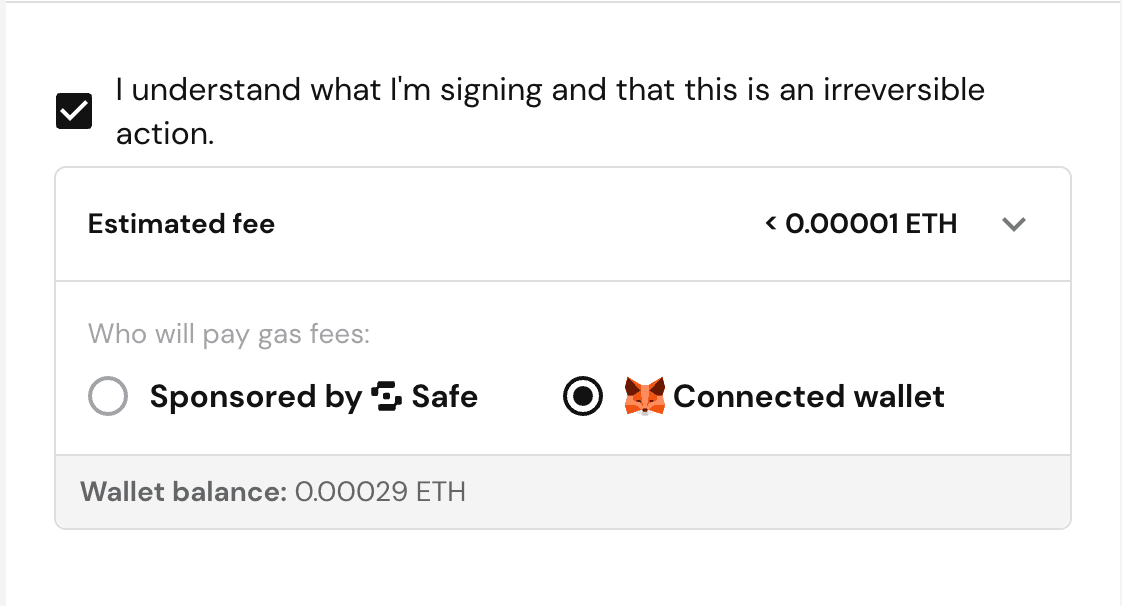
Scatter supports deploying and managing your contract directly from a Safe, via WalletConnect.
If deploying a Scatter contract from a Safe, do NOT use the "sponsored by Safe" option for gas fees. This breaks our ability to get the correct transaction hash and find your contract address after deployment. Instead, choose to pay the gas fee with your own wallet.
Common Scams
There are a variety of common scams that people use to trick you. If in doubt, ask someone who is less stupid than you are if some link or thing you were sent is too good to be true.
A common type of scam involves a site that tells you it is connecting you to its site, but it is actually having you sign a transaction which allows a scammer to buy NFTs you have listed on marketplaces. If you have approved collections on marketplaces, when you fall for these scams it can enable people to buy your NFTs for ~0 ETH. This is what has happened when you see NFTs being sold for near 0 ETH. This kind of scam is why you should simply not connect to random websites, especially random sites which were sent to you by someone you don't know.
- If you get a random DM or notification that has a link to a page which wants to connect to your wallet, treat it as suspicious and verify it independently.
- If you suddenly get a DM or ping in a place like Discord to connect to a new site that you have never interacted with before you should be on high alert. It often happens that a Discord moderator gets their account compromised and a scammer uses it to blast out a fake mint site. While these kinds of sudden drops are not always scams, you should expect them to be scams, and collection creators who choose to have minting on their site need to broadcast the only domain they will be using in advance and make their audience more cautious of other random links suddenly showing up.
- If you get airdropped an NFT which lists a domain in the image or description telling you to claim something you should be highly suspect. You might see these on the profiles of others too. You should not follow unknown claim links; hide suspicious airdrops instead.
- If someone wants to trade you NFTs out of nowhere it's likely a scam. If someone really wants to buy your NFTs tell them you will accept an offer on a common marketplace and not an OTC trading site.
- There are more common scams listed here ↗, some of which Pocket Universe is more likely to protect you from and some you just need to know about and be more wary of. It is worth your time to review the common scams so that you are more aware of them when they show up in your timeline.
Use the official Scatter site ↗ and check the full URL before connecting or signing. Review the wallet's message or transaction details rather than treating a familiar name or link as a safety guarantee. See MetaMask's signature phishing guidance ↗ for examples of how misleading signature requests can put assets at risk.
Even if you are very smart don't think you will be able to avoid all scams without some discipline. Do not use your crypto devices while you are depressed, exhausted, sick, or on drugs that alter your physical/mental state. You will be easier to manipulate in these states and more likely to fall for scams. Smart people in compromised mental states fall for scams every day. Even people who are used to seeing scams constantly still fall for scams in moments of weakness. Be diligent!